Package
discord-component-embed v0.2.1
discord-component-embed
Show your own card when someone shares your link on Discord.
Changelog · Reference · Discord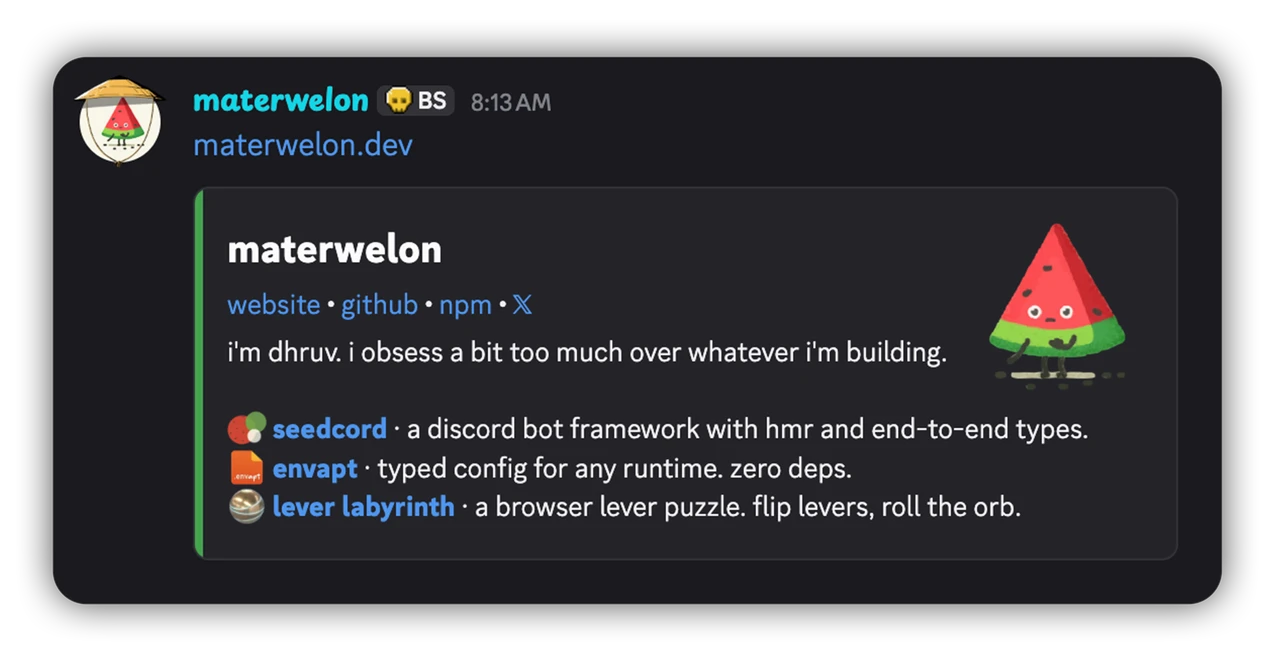


Contents
- About
- Installation
- Build a card
- Put it in your page
- JSX setup
- Linked JSON
- Your own components
- Custom emoji
- Testing your card
- Components
- Errors
About
When someone pastes a link to your site into Discord, Discord fetches the page and builds a preview card from its Open Graph tags. A component embed replaces that card with a layout made of Discord's message components: markdown, images, a gallery, an accent color, and link buttons. The card above is one.
You describe the card with JSX or with h(), in any framework or none. The package checks it against Discord's rules for the format, then writes the JSON Discord reads from your page.
Discord marks link previews as subject to change. Until v1.0.0, a minor version of this package can break too.
Installation
pnpm add discord-component-embedYou don't need React. Only discord-component-embed/react uses it, and it works with React 17, 18, and 19. Nothing in the package imports from Node, so it runs on Node, Bun, Deno, and edge runtimes.
Build a card
A card is a tree of components with one <Container> at the root.
// src/cards/PostCard.tsx
import { ActionRow, Container, LinkButton, Section, TextDisplay, Thumbnail } from 'discord-component-embed';
import type { Post } from '../lib/posts';

export function PostCard({ post }: { post: Post }) {
    return (
        <Container accentColor={0x45a44f}>
            <Section accessory={<Thumbnail url={post.cover} description={post.coverAlt} />}>
                <TextDisplay>
                    # [{post.title}]({post.url}){'\n'}
                    {post.summary}
                </TextDisplay>
                <TextDisplay>-# {post.readingTime} min read</TextDisplay>
            </Section>
            <ActionRow>
                <LinkButton url={post.url} label="Read" />
                <LinkButton url="https://example.com/rss.xml" label="RSS" />
            </ActionRow>
        </Container>
    );
}
0x45a44f colors the bar down the card's left edge. Discord shows the <Thumbnail> to the right of the two blocks of text. JSX turns a line break in your source into a space. The {'\n'} after the title puts post.summary on its own line.
This file compiles with React's JSX, Preact's, or the package's own. If your project has no JSX yet, JSX setup shows the two lines to add.
Without JSX, build the same card with h(). It takes a component, its props, then its children.
// src/cards/buildPostCard.ts
import { ActionRow, Container, LinkButton, Section, TextDisplay, Thumbnail, h } from 'discord-component-embed';
import type { Post } from '../lib/posts';

export function buildPostCard(post: Post) {
    return h(
        Container,
        { accentColor: 0x45a44f },
        h(
            Section,
            { accessory: h(Thumbnail, { url: post.cover, description: post.coverAlt }) },
            h(TextDisplay, null, `# [${post.title}](${post.url})\n${post.summary}`),
            h(TextDisplay, null, `-# ${post.readingTime} min read`)
        ),
        h(
            ActionRow,
            null,
            h(LinkButton, { url: post.url, label: 'Read' }),
            h(LinkButton, { url: 'https://example.com/rss.xml', label: 'RSS' })
        )
    );
}
TypeScript checks each h() call against the component's props. A Section without an accessory fails to compile, and so does a TextDisplay without text.
Put it in your page
Discord doesn't run JavaScript when it fetches your page. The card has to be in the HTML your site serves, as a <script> tag with the card's JSON inside. It works in the <head> or the <body>.
| your site | works | how |
|---|---|---|
| server rendering (Next, Nuxt, SvelteKit, Astro) | yes | the server writes the tag into each page |
static build (Astro, Next output: 'export', SvelteKit prerender, Eleventy) |
yes | the build writes the tag into each HTML file |
| plain HTML | yes | generate the tag once and paste it in |
client-only app, where index.html starts empty |
one card for the whole site | a tag added in the browser never reaches Discord, so put one tag in index.html |
Keep your Open Graph tags. Other sites and apps build their previews from them, and Discord falls back to them whenever it can't use the component embed.
Discord reads the tag from each page separately. If you add it to a layout that every page shares, every page shows the card, so add it only to the pages that should show one.
React and Next.js
<ComponentEmbed> renders the tag.
// app/blog/[slug]/page.tsx
import { ComponentEmbed } from 'discord-component-embed/react';
import { PostCard } from '@/cards/PostCard';
import { getPost } from '@/lib/posts';

export default async function BlogPost({ params }: PageProps<'/blog/[slug]'>) {
    const post = await getPost((await params).slug);

    return (
        <>
            <ComponentEmbed>
                <PostCard post={post} />
            </ComponentEmbed>
            <article>{post.body}</article>
        </>
    );
}
Render it on the server or at build time. In a client component, the tag only exists in the browser.
Preact
Preact's JSX builds elements the package reads, so PostCard works as written. toComponentEmbedScript returns the tag as a string, ready for the <head> of the HTML your server sends.
import { toComponentEmbedScript } from 'discord-component-embed';
import { PostCard } from './cards/PostCard';
import { getPost } from './lib/posts';

const post = await getPost(slug);
const tag = toComponentEmbedScript(<PostCard post={post} />);
Vue and Nuxt
Build the card with h(), since Vue's JSX makes Vue elements. Pass its JSON to useHead.
<!-- pages/blog/[slug].vue -->
<script setup lang="ts">
import { toComponentEmbedJson } from 'discord-component-embed';
import { buildPostCard } from '~/cards/buildPostCard';
import { getPost } from '~/lib/posts';

const post = await getPost(useRoute().params.slug);

useHead({
    script: [
        {
            id: 'discord:component-embed',
            type: 'application/json',
            innerHTML: toComponentEmbedJson(buildPostCard(post))
        }
    ]
});
</script>
Discord reads only a script with the id discord:component-embed. toComponentEmbedJson escapes every < in the JSON, so text in the card can't close the tag early.
Svelte and SvelteKit
Build the card with h() in a server load function, and return the finished tag.
// src/routes/blog/[slug]/+page.server.ts
import { toComponentEmbedScript } from 'discord-component-embed';
import { buildPostCard } from '$lib/cards/buildPostCard';
import { getPost } from '$lib/posts';

export const load = async ({ params }) => {
    const post = await getPost(params.slug);
    return { post, card: toComponentEmbedScript(buildPostCard(post)) };
};
<!-- src/routes/blog/[slug]/+page.svelte -->
<script>
let { data } = $props();
</script>
<svelte:head>
{@html data.card}
</svelte:head>
toComponentEmbedScript escapes every < in the JSON, so {@html} can write it as it is.
Astro
JSX inside an .astro file compiles to Astro elements, so build the card in its own file. buildPostCard from Build a card works as it is. For JSX, follow the JSX setup and export a function from a .tsx file that returns <PostCard post={post} />.
---
// src/layouts/Post.astro
import { toComponentEmbedScript } from 'discord-component-embed';
import { buildPostCard } from '../cards/buildPostCard';

const { post } = Astro.props;
---

<html>
    <head>
        <Fragment set:html={toComponentEmbedScript(buildPostCard(post))} />
    </head>
    <body><slot /></body>
</html>
Solid
Build the card with h(), since Solid's Vite plugin compiles every .tsx file with Solid's JSX. Then render the script in a server-rendered route, with the JSON from toComponentEmbedJson.
import { toComponentEmbedJson } from 'discord-component-embed';
import { buildPostCard } from '~/cards/buildPostCard';

<script id="discord:component-embed" type="application/json" innerHTML={toComponentEmbedJson(buildPostCard(post))} />;
Solid writes innerHTML into the page as it is. toComponentEmbedJson escapes every < in the JSON, so text in the card can't close the tag early.
Plain HTML
Generate the tag with a short Node script, then paste what it prints into your page's <head>.
// card.mjs, run with: node card.mjs
import { Container, TextDisplay, h, toComponentEmbedScript } from 'discord-component-embed';

const card = h(Container, { accentColor: 0x45a44f }, h(TextDisplay, null, '# My site\nWhat it is about.'));

console.log(toComponentEmbedScript(card));JSX setup
If your project already uses React or Preact, you're set. Their JSX builds elements this package reads.
In a project without a JSX framework, like Astro, Svelte, or a Node script, point TypeScript at the package's JSX:
{
    "compilerOptions": {
        "jsx": "react-jsx",
        "jsxImportSource": "discord-component-embed"
    }
}
TypeScript applies these two settings to .tsx and .jsx files only, so .astro and .svelte files compile as before. If you add React later, move jsxImportSource into the one file that builds the card:
/** @jsxImportSource discord-component-embed */That comment only works while jsx is set to react-jsx. If jsx isn't set, TypeScript reports "Cannot use JSX unless the '--jsx' flag is provided".
Vue's and Solid's Vite plugins compile every .tsx file with their own JSX and ignore the comment. In those projects, use h().
Linked JSON
You can also keep the JSON out of the page. Discord then fetches it from its own URL on your site, and componentEmbedResponse builds the response for that URL.
// app/embeds/blog/[slug]/route.tsx in Next.js
import { componentEmbedResponse } from 'discord-component-embed';
import { PostCard } from '@/cards/PostCard';
import { getPost } from '@/lib/posts';

export async function GET(_request: Request, { params }: { params: Promise<{ slug: string }> }) {
    const post = await getPost((await params).slug);
    return componentEmbedResponse(<PostCard post={post} />);
}
The route builds PostCard for whichever post slug points at. componentEmbedResponse checks the JSON against Discord's 3,000-byte limit for linked payloads, then returns a Web Response with an application/json content type. Any framework whose routes return a Web Response works the same way, like a SvelteKit +server.ts.
Point the page at that URL with a <link> tag. The href has to be an absolute https URL on the page's host, a subdomain of it, or its parent domain.
<link rel="discord:component-embed" type="application/json" href="https://example.com/embeds/blog/hello-world" />
Your own components
Split a big card into plain function components, the way you would a page. They work anywhere in the tree, including as the root and as a <Section> accessory.
import { TextDisplay } from 'discord-component-embed';

function Headline({ title }: { title: string }) {
    return <TextDisplay># {title}</TextDisplay>;
}
The package calls Headline with its props while it reads the tree, outside any framework's renderer. So a component that calls a hook or reads context throws a ComponentEmbedError, and so do memo, lazy, forwardRef, and class components. A component that is async or suspends throws too, so load your data first and pass it in as props.
If your component passes its children into one of the package's components, type that prop as EmbedNode.
Custom emoji
A custom emoji in text uses Discord's markdown form, <:name:id>, or <a:name:id> for an animated one. On a button, it's an object.
<TextDisplay>Built with {'<:seedcord:1538077321318236281>'} seedcord</TextDisplay>

<LinkButton url="https://seedcord.org" label="seedcord" emoji={{ name: 'seedcord', id: '1538077321318236281' }} />
Write the emoji in a TextDisplay as a string, {'…'}, because JSX reads a bare < as the start of a tag. The button takes the same id and name, plus animated: true for a gif.
Emojis you upload to your app in the Discord Developer Portal work. To find an emoji's id, send \:seedcord: in Discord. The message shows the markdown form, id included.
Testing your card
Discord has to reach the page, so a card on localhost needs a public URL. A cloudflared quick tunnel gives you one without an account:
cloudflared tunnel --url http://localhost:4321It prints a trycloudflare.com URL to paste into Discord. A Vite dev server rejects a host it doesn't recognize, so either serve a build or add the tunnel's host to server.allowedHosts.
Discord caches a preview for about 30 minutes, so an edit won't show on a link you've already shared. Add a new query string, like ?v=2, to see it right away. Changing only the #fragment doesn't help, since Discord leaves the fragment out of its cache key. Discord's Embed Debugger shows which tags it read from any URL.
To check a card without Discord, toComponentEmbed returns the payload as an object. A test can build every page's card with it before you deploy. To write the JSON into a page yourself, use toComponentEmbedJson. It escapes the JSON for HTML.
Components
| Component | Goes in | Takes |
|---|---|---|
Container |
the root | accentColor, spoiler, and the components below |
TextDisplay |
Container, Section |
Discord markdown as text children |
Section |
Container |
1 to 3 TextDisplay children and an accessory |
Thumbnail |
a Section accessory |
url, description, spoiler |
LinkButton |
ActionRow, a Section accessory |
url, label, emoji, disabled |
MediaGallery |
Container |
1 to 10 MediaGalleryItem children |
MediaGalleryItem |
MediaGallery |
url, description, spoiler |
Separator |
Container |
divider, spacing ('small' or 'large') |
ActionRow |
Container |
1 to 5 LinkButton children |
The reference lists every export, with an example on each.
Errors
Discord doesn't report an invalid payload anywhere. It drops the payload and shows the Open Graph card. So toComponentEmbed, toComponentEmbedJson, toComponentEmbedScript, <ComponentEmbed>, and componentEmbedResponse throw a ComponentEmbedError when:
- the root is anything other than one
Container - a component is somewhere it isn't allowed, or text is outside a
TextDisplay - a parent has too many or too few children, and a
Containerneeds at least one - a
TextDisplayis empty or holds anything besides text - a prop has the wrong type, like the string
'yes'where Discord needs a boolean, or aspacingother than'small'or'large' - one of your components throws, uses a hook, suspends, is async, or is anything but a plain function
- the tree holds an element from Vue's
h() accentColoris outside0to0xFFFFFF- a
LinkButtonhas neither alabelnor anemoji, has a label over 80 characters, or has aurlthat is over 512 characters or nothttp,https, ordiscord - a media
urlis over 2048 characters or nothttporhttps, or itsdescriptionis over 1024 characters - any
urlhas whitespace in it - the embed has more than 40 components, counting the container
- linked JSON is larger than 3000 bytes
Every ComponentEmbedError carries a code: InvalidStructure, InvalidProp, OverLimit, UnsupportedComponent, or ReadFailed. Branch on the code, since the message wording can change in any release. If a component or an iterator of yours throws while the tree is read, you get a ReadFailed with the original error on cause.
Discord also has to fetch the page and every image within 10 seconds, without a login or a bot challenge. This package can't check that for you. If your site uses bot protection, allow user agents containing Discordbot.